AI Agents Learnings
Notes from two videos on building AI agents practically, without the hype.
Sources: Part 1 — How to Build Effective AI Agents (without the hype) · Part 2 — Building AI Agents in Pure Python
What Are AI Agents?
The popular definition: a pipeline of automation that at some point calls an LLM API. But not all AI systems are AI agents. Anthropic draws a clearer distinction between workflows (predefined control flow) and agents (LLM-driven dynamic decisions).
The Anthropic blog post on building effective agents is the key reference here.
Patterns
| Category | Pattern |
|---|---|
| Building Block | Augmented LLMs — retrieval, tools, memory |
| Workflow | Prompt Chaining |
| Workflow | Routing |
| Workflow | Parallelization |
| Workflow | Orchestrator-Workers |
| Workflow | Evaluator-Optimizer |
Tips for Building Agents
- Be careful with agent frameworks. They get you running fast, but you won’t understand what’s happening underneath. Learn the primitives first — it makes you a better engineer.
- Prioritize deterministic workflows over complex agent patterns. Start simple. Understand the problem, look at all available data, categorize it, and solve it in a way that works 100% of the time before reaching for agents.
- Don’t jump from prototype to production. Classic path to hallucination chaos. Scale carefully.
- Build testing and evaluation systems from the beginning — not as an afterthought.
- Put guardrails on outputs. Before sending a response back to the user, have a second LLM check whether the answer is actually appropriate to send.
Building Blocks in Code
From Building AI Agents in Pure Python
You don’t need any fancy frameworks to build AI agents — the LLM provider APIs are enough. The first ~23 minutes of that video cover practical code for the four core building blocks:
- Memory — persisting conversation context
- Structured output — constraining model responses to a schema
- Retrieval — fetching external knowledge at inference time
- Tools — letting the model call functions
Workflow Patterns in Practice
Break down the problem the way a human would think about and approach it. A few notes:
- Parallelization is especially well-suited for guardrail checks — run safety evaluation in parallel with the main response rather than sequentially.
References
Andrew Ng: The Rise of AI Agents and Agentic Reasoning
Notes from Andrew Ng’s BUILD 2024 Keynote.
Source: Andrew Ng Explores The Rise Of AI Agents And Agentic Reasoning — BUILD 2024 Keynote
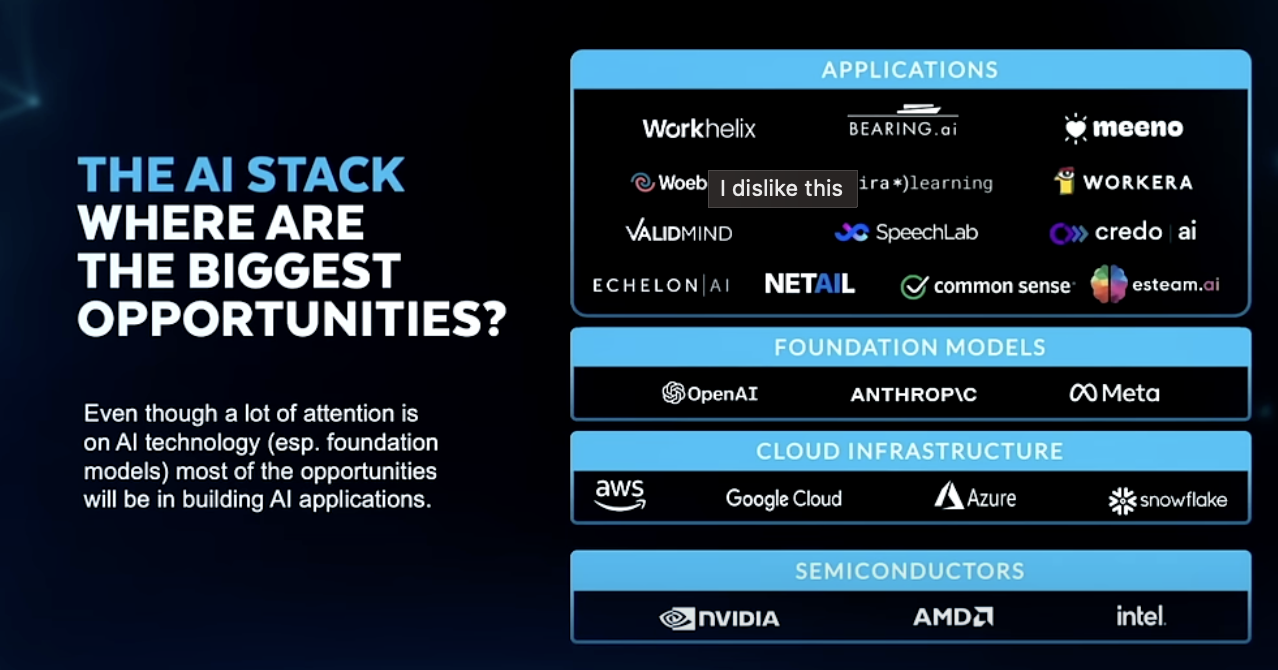
The AI Stack — Where Are the Biggest Opportunities?
Even though a lot of attention is on AI technology (foundation models), most of the opportunities will be in building AI applications.
- Generative AI is enabling fast ML product development
- Agentic AI workflows is the most important AI technology to pay attention to right now
Agentic vs Non-Agentic Workflows
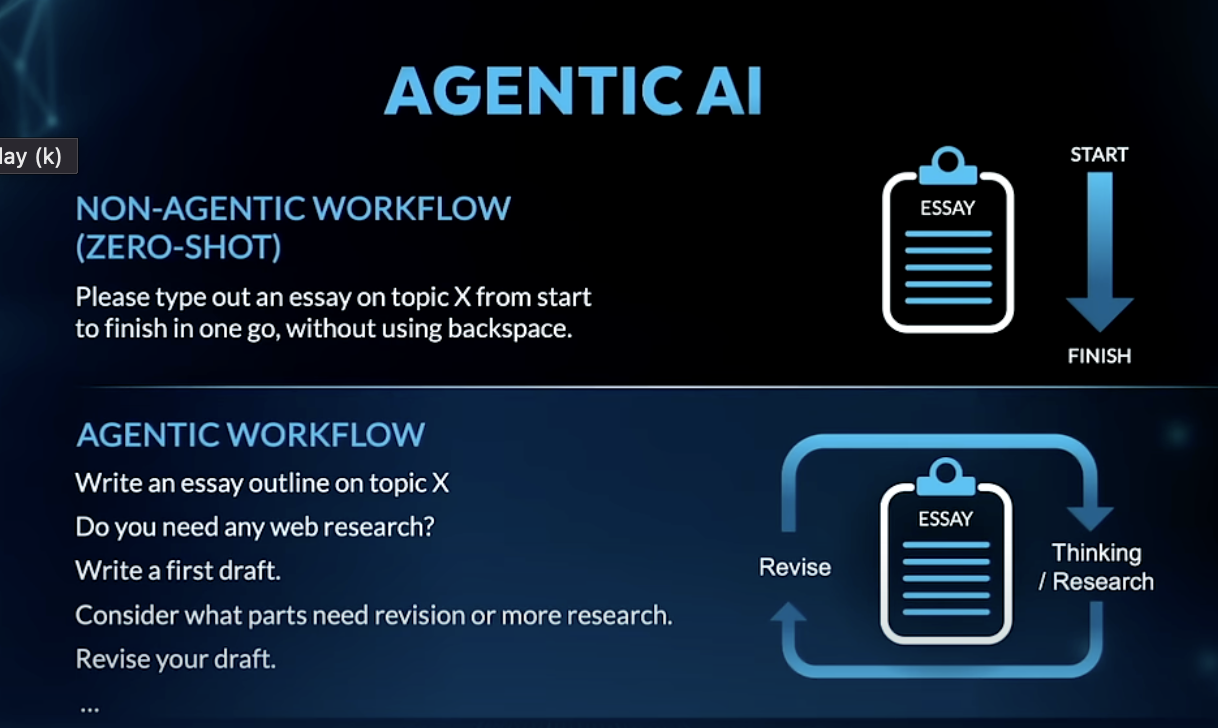
| Non-Agentic (Zero-Shot) | Agentic | |
|---|---|---|
| How it works | Single prompt, start to finish in one go | Iterative — outline → draft → research → revise |
| Analogy | Writing an essay without backspacing | Writing the way a human actually would |
The iterative loop (plan → act → reflect → revise) is what makes agentic workflows substantially more capable than single-shot prompting.
4 Agentic Reasoning Design Patterns
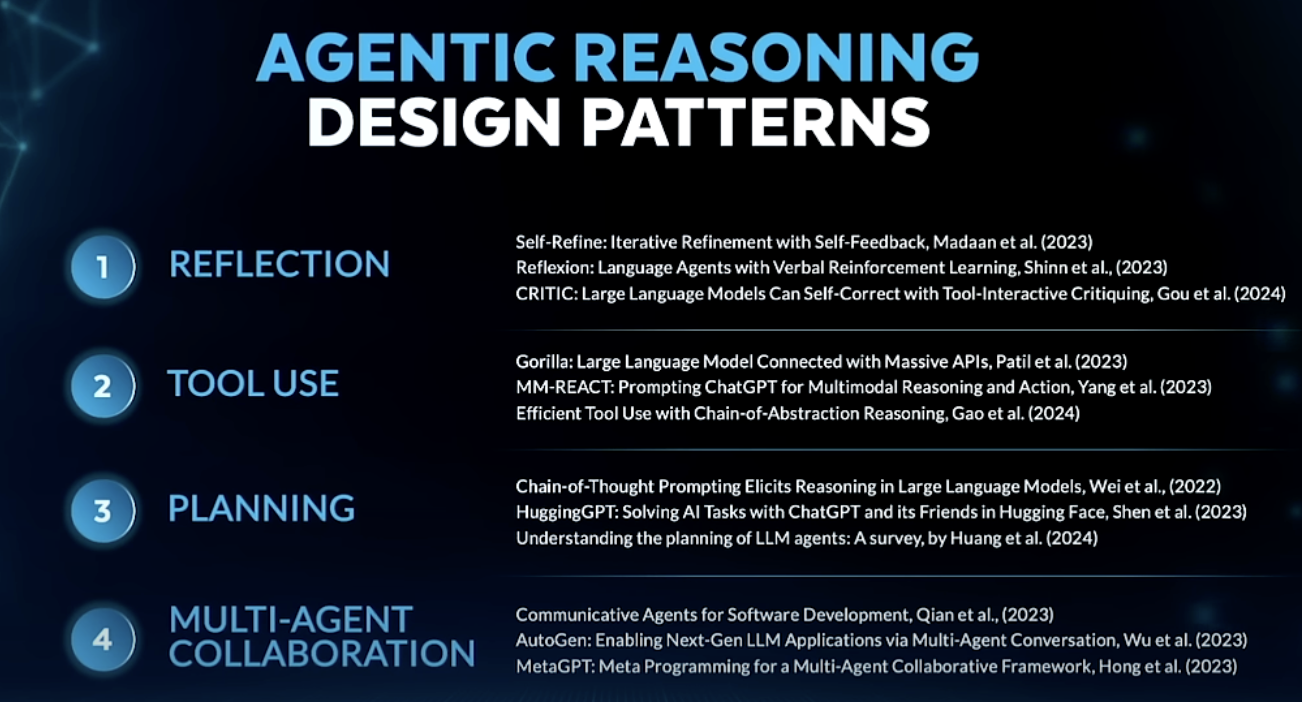
- Reflection — Model reviews and critiques its own output, then improves it
- Self-Refine, Reflexion, CRITIC
- Tool Use — Model makes API calls (web search, code execution, external data)
- Gorilla, MM-REACT, Efficient Tool Use with Chain-of-Abstraction
- Planning — Model decides on steps before acting; chain-of-thought drives task decomposition
- Chain-of-Thought Prompting Elicits Reasoning, HuggingGPT, Talking to Tasks
- Multi-Agent Collaboration — Multiple specialized agents communicate and divide work
- Communicative Agents for Software Development, AutoGen, MetaGPT
LMM — Large Multi-Model Workflows
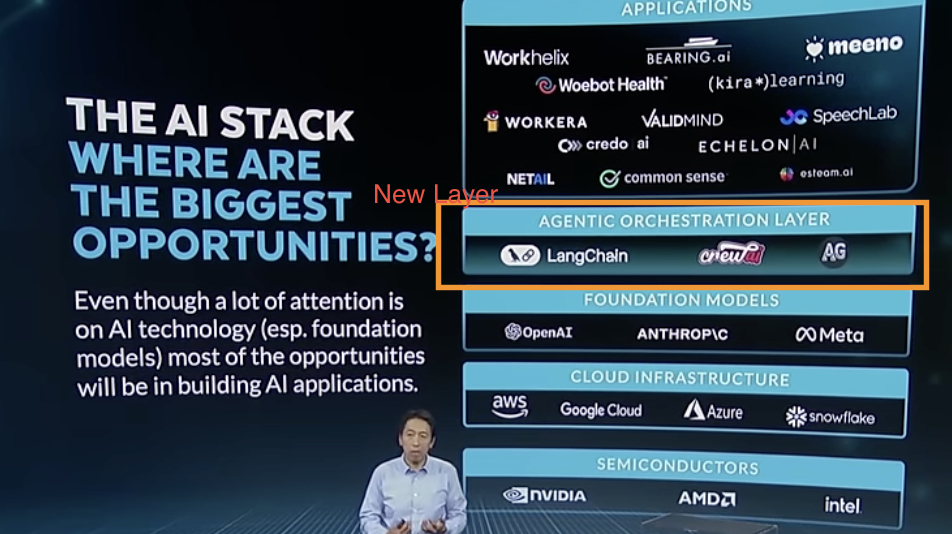
The AI Stack is gaining a new layer: an orchestration layer that coordinates across models, tools, and agents.
Four AI Trends to Watch
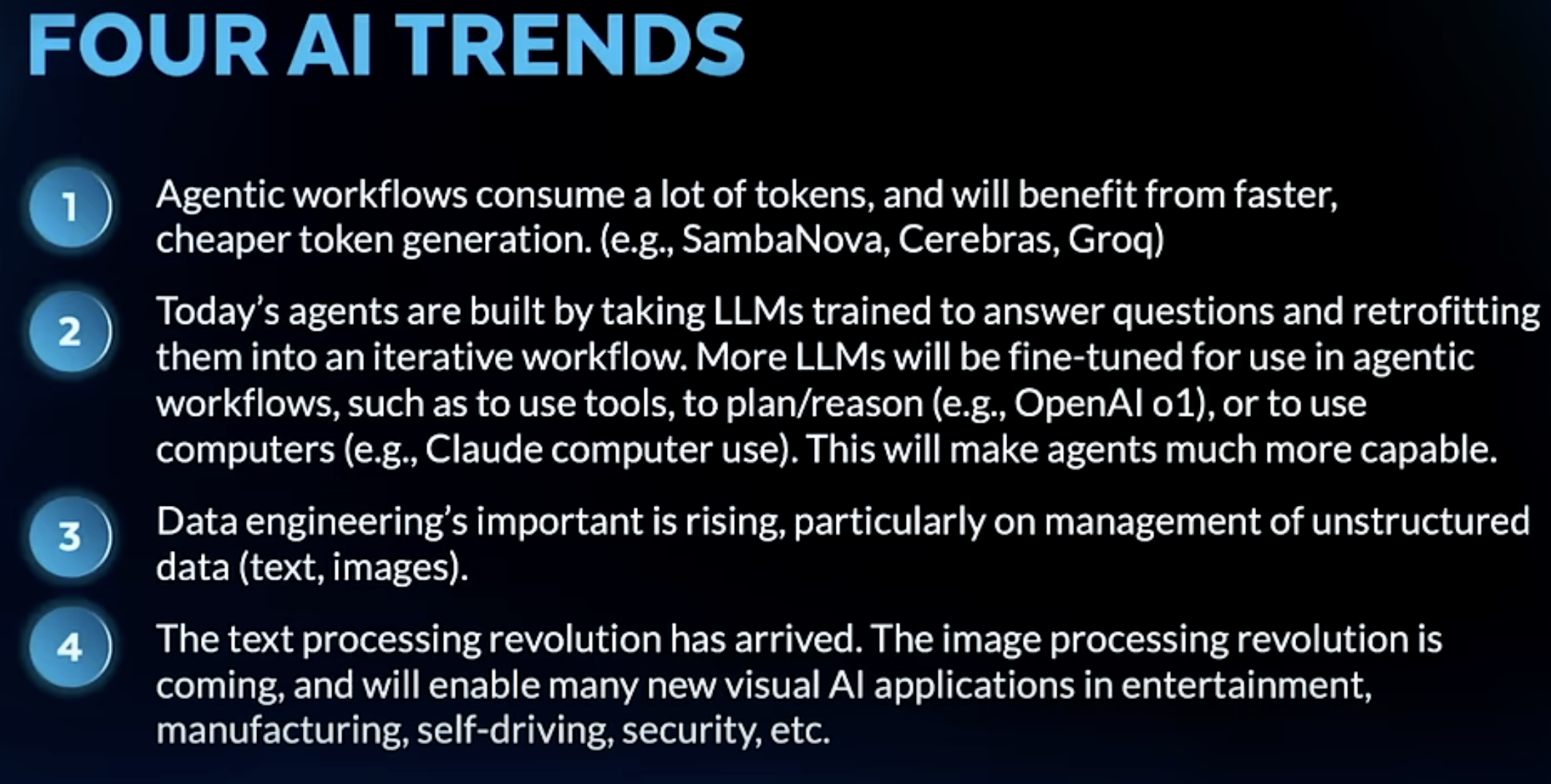
- Agentic workflows are token-hungry — will benefit from faster, cheaper token generation (SambaNova, Cerebras, Groq)
- Today’s agents = retrofitted LLMs — models trained to answer questions, then adapted into iterative workflows; future models will be fine-tuned natively for agentic use (tool use, planning, computer use)
- Data engineering is rising in importance — particularly unstructured data management (text, images)
- The text processing revolution is here; image processing is next — will unlock new visual AI applications in entertainment, manufacturing, self-driving, and security
What is a Coding Assistant — Anthropic Claude Code in Action
Notes from Anthropic’s Claude Code in Action course.
What Is a Coding Assistant?
A coding assistant is a tool — it does whatever the model instructs it to do (e.g. read a file, run a command, edit code). The language model is the brain; the assistant is the hands.
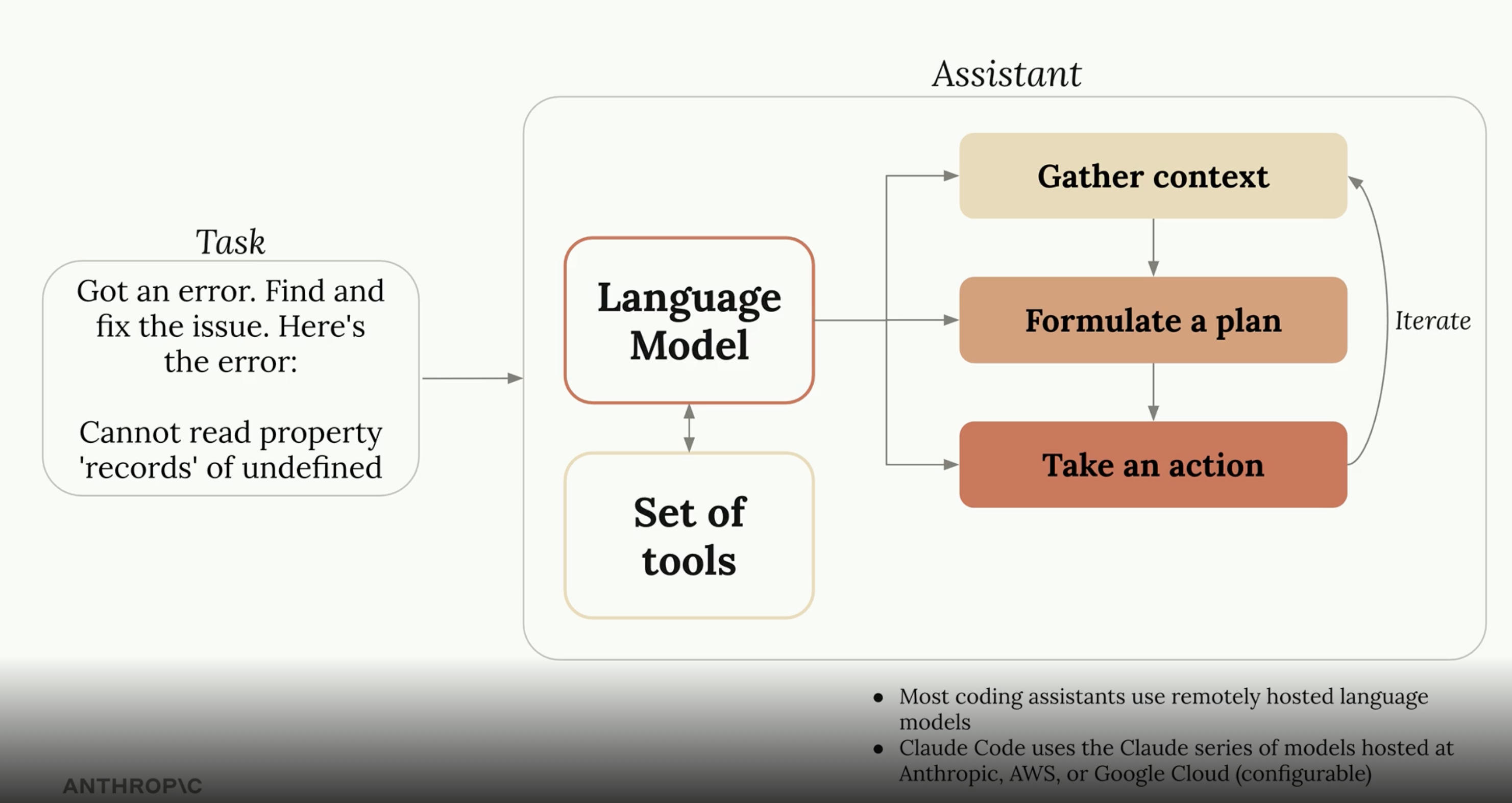
The assistant loop:
- Gather context — read files, search code, understand the codebase
- Formulate a plan — decide what steps are needed
- Take an action — execute via tools, observe the result, iterate
Most coding assistants use remotely hosted language models. Claude Code uses the Claude series of models hosted at Anthropic, AWS, or Google Cloud (configurable).
How Tools Work
Models are given plain text descriptions of what each tool does — e.g. ReadFile: main.go. The model decides which tool to call and when, based solely on those descriptions. Claude’s models are particularly good at interpreting tool descriptions and chaining calls to complete multi-step tasks. The tool set is extensible — new tools can be added as needed (via MCP).
Tool call lifecycle:
User prompt
    │
    ▼
Model reasons → selects tool + arguments
    │
    ▼
Tool executes in the environment
    │
    ▼
Result returned to model's context
    │
    ▼
Model reasons again → next tool call or final response
Tools Available in Claude Code
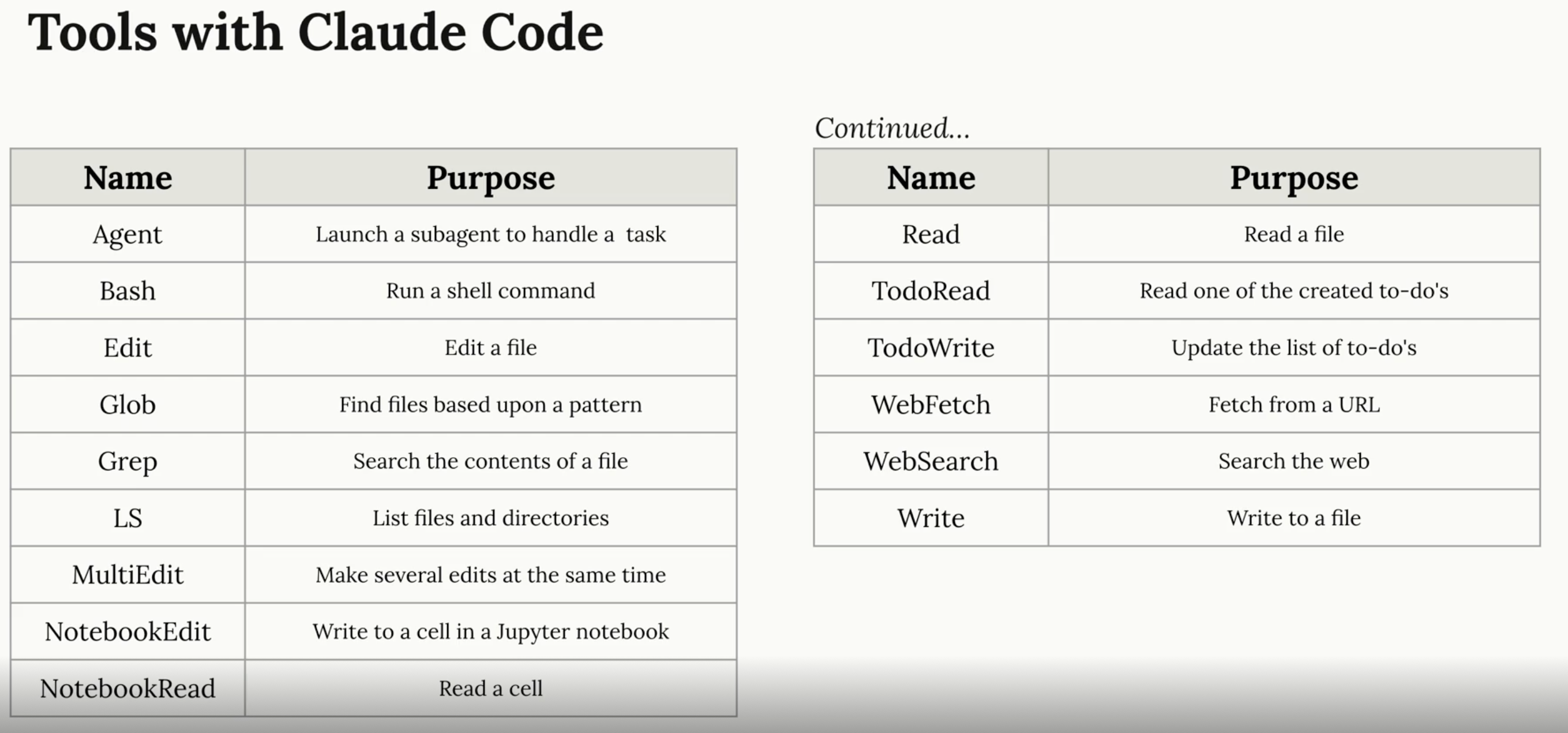
| Tool | Purpose |
|---|---|
| Agent | Launch a subagent to handle a subtask in parallel or isolation |
| Bash | Run a shell command |
| Edit | Make targeted edits to an existing file |
| MultiEdit | Make several edits to a file in one call |
| Write | Write (or overwrite) a file |
| Read | Read a file |
| Glob | Find files matching a pattern |
| Grep | Search file contents |
| LS | List files and directories |
| NotebookRead | Read a Jupyter notebook cell |
| NotebookEdit | Write to a Jupyter notebook cell |
| WebFetch | Fetch content from a URL |
| WebSearch | Search the web |
| TodoRead | Read the agent’s to-do list |
| TodoWrite | Update the agent’s to-do list |
Tools are grouped by what they touch:
| Category | Tools |
|---|---|
| File system | Read, Write, Edit, MultiEdit, Glob, Grep, LS |
| Execution | Bash |
| Web | WebFetch, WebSearch |
| Orchestration | Agent, TodoRead, TodoWrite |
| Notebooks | NotebookRead, NotebookEdit |
Giving Claude Code Project Context
Claude Code looks for a CLAUDE.md file at the root of your project. This file is always loaded into context and is the primary way to give the model persistent, project-specific knowledge.
What to put in CLAUDE.md:
## Commands
# How to build, test, lint, run the project

## Architecture
# Key directories, design decisions, conventions

## Conventions
# Naming rules, code style, patterns to follow or avoid
Think of
CLAUDE.mdas onboarding docs written for the model, not for humans. Be specific about what the model should and shouldn’t do.
Additional context mechanisms:
| Mechanism | Scope | Purpose |
|---|---|---|
CLAUDE.md (project root) |
Project-wide | Architecture, commands, conventions |
CLAUDE.md (subdirectory) |
Subtree | Module-specific rules |
~/.claude/CLAUDE.md |
Global | Personal preferences across all projects |
| Memory files | Persistent | Facts remembered across sessions |
Permissions & Safety
Claude Code uses a permission model to control what tools can run without prompting:
- Auto-approved — read-only operations (Read, Glob, Grep, LS) are typically allowed by default
- Prompt-required — writes, shell commands, and web requests require approval unless explicitly allowed
settings.json— configure per-project or global allowlists to reduce friction on trusted operations
{
  "permissions": {
    "allow": [
      "Bash(npm run *)",
      "Bash(git diff*)",
      "Edit"
    ]
  }
}
The permission model exists because coding assistants take real actions with real consequences — deleting files, pushing code, sending requests. Trust is granted explicitly, not assumed.
Extending Claude Code
Claude Code is designed to be extended through three mechanisms that compose cleanly together:
| Extension | What It Adds |
|---|---|
| MCP Servers | New tools connected to external APIs, databases, or services |
| Skills | Packaged workflows the agent can load and execute on demand |
| Subagents | Parallel agent instances for isolated or concurrent subtasks |
Example — a code review workflow:
User: "Review this PR"
  │
  ├── Subagent A → reads changed files, checks logic
  ├── Subagent B → checks tests and coverage
  └── MCP (GitHub) → posts review comments via API
Slash Commands & Shortcuts
Claude Code supports /commands as shortcuts for common workflows. These can be built-in or custom:
| Command | Purpose |
|---|---|
/help |
List available commands |
/clear |
Clear conversation context |
/compact |
Summarize and compress context to free up tokens |
/memory |
View or edit persistent memory |
/config |
View or change settings |
Custom (/my-command) |
Run a custom workflow defined in .claude/commands/ |
Key Takeaways
| Concept | Key Idea |
|---|---|
| Coding assistant | LLM as brain, tools as hands — loops through context → plan → act |
| Tool system | Plain text descriptions; model decides what to call and when |
CLAUDE.md |
Always-loaded project context — architecture, conventions, commands |
| Permission model | Explicit allowlists control what runs without prompting |
| MCP | Extends the tool set with external services without modifying the agent |
| Skills | Packaged reusable workflows loaded on demand |
| Subagents | Parallel isolation — delegate subtasks to fresh agent instances |
Course: Claude Code in Action — Anthropic
Agent Skills with Anthropic
Notes from the Agent Skills with Anthropic course on DeepLearning.AI.
What Is a Skill?
A skill is a folder of organized instructions that gives an agent a new, specialized capability — without hardcoding that behavior into the agent itself. Skills are an open standard, meaning any skills-compatible agent (not just Claude) can use them.
Think of a skill as a reusable playbook: you describe the workflow once, package it, and the agent knows how to run it whenever it’s needed.
A skill includes:
- A
SKILL.mdfile — the entry point with the skill’s name, description, and main instructions - Optional supporting files — scripts, additional markdown, templates, images, data — all referenced from
SKILL.md
Skill Anatomy
Directory Structure
my-skill/
├── SKILL.md          ← required entry point
└── references/
    ├── instructions.md
    ├── analysis.py
    └── template.csv
SKILL.md Format
The file opens with a YAML-like header that defines the skill’s identity, followed by the full instructions:
---
name: Weekly Marketing Analysis
description: Analyzes weekly campaign data and produces a performance summary report.
---

## Instructions

1. Load the provided CSV file from the user
2. Run `references/analysis.py` on the data
3. Fill in `references/template.csv` with results
4. Summarize key metrics and trends in a brief report
Only the
nameanddescriptionare loaded at session start. The full instructions load only when the skill is triggered — this is progressive disclosure.
-
Agent Skill specification: https://agentskills.io/specification
Progressive Disclosure
Skills are designed to protect the context window.
Session start:
  Context window ← [skill name + description only]

User triggers skill:
  Context window ← [skill name + description + full SKILL.md instructions]

During execution (if needed):
  Context window ← [+ referenced files, loaded on demand]
  Scripts        ← executed outside the context window
Why this matters:
| Without Progressive Disclosure | With Progressive Disclosure |
|---|---|
| All skill content loaded upfront | Only name/desc loaded at start |
| Context fills up fast | Context stays clean |
| More tokens → degraded responses | Instructions arrive exactly when needed |
| Scripts pollute context with output | Scripts run separately, results summarized |
Creating a Skill
- Create a folder — use lowercase with hyphens (e.g.,
weekly-marketing-analysis). No reserved keywords. - Add
SKILL.mdwith a YAML header (name,description) followed by your instructions. - Add a
references/subfolder for any supporting files the skill needs (scripts, templates, data). - Zip the folder.
- In Claude Desktop → Capabilities → Skills, upload the zip and enable it.
Once enabled, prompting Claude to do something that matches the skill’s description will automatically load and apply it.
When to Use a Skill
If you find yourself having the same conversation across sessions — explaining the same workflow over and over — it’s a strong candidate for a skill.
| Signal | Example |
|---|---|
| Repeated workflow | “Every Monday, analyze the new marketing CSV and produce a summary” |
| Cross-session pattern | Asking the agent to follow the same code review checklist every PR |
| Specialized domain knowledge | Custom security audit steps for your codebase |
| Multi-step process | Data ingestion → transform → validate → report |
Skills vs Tools vs MCP vs Subagents
These four building blocks are complementary, not competing:
| Mechanism | What It Is | Best For |
|---|---|---|
| Skills | Packaged instructions + assets | Encoding how to do a repeated workflow |
| Tools | Functions the agent can call (bash, read, write, web) | Taking discrete actions in the environment |
| MCP | Protocol for connecting agents to external services | Integrating with APIs, databases, third-party systems |
| Subagents | Separate agent instances spun up to handle subtasks | Parallelism, isolation, or tasks needing a fresh context |
Skills work with the others — a skill can instruct the agent to use a specific MCP server, call a tool, or delegate to a subagent. This composition is where the real power comes from.
Example workflow:
User: "Run the weekly marketing report"
  │
  ▼
Skill loads → provides instructions
  │
  ├── Tool (Bash) → runs analysis.py
  ├── MCP (Google Drive) → uploads report
  └── Subagent → drafts the email summary
- MCP connects our agents or AI applications with external systems and data, anytime you need external context model doesn’t know about MCP is very useful.
- MCP is bringing in all underlying tooling we need and the skill is a set of intructions to put those tools together to build particular workflows that are repeatable.
- Tools are a bit more lower level
- Tool defn always live in the context window, skills are progressively loaded when necessary
- We can think of a subagent, as an agent which can be spawn or created by a main agent, that can report back to main agent.
- Subagents can have an isolated context, with fine grained permissions as well as executing tasks in parallel. They can have limited set of permissions as well as access to skills.
- When we think about context window we need to be intentional, we need to be mindful of how subagents can help us minimize what goes into the context window and how MCP loads the data necessary. Skills should be loaded progressively
- Subagents can persist across sessions, skills can persist across conversations
- Use skills for procedural and predictable workflows, and subagents for full agentic logic for specialized tasks
Exploring Pre-Built Skills
- Public Repo of Agent Skills: https://github.com/anthropics/skills
- skill-creator is a skill to help programmatically create a skill for you
Key Takeaways
| Concept | Key Idea |
|---|---|
| Skill | Folder of instructions + assets; open standard; any compatible agent can use it |
| SKILL.md | Entry point with name/description header + full instructions body |
| Progressive disclosure | Name/desc always loaded; full instructions only on trigger; scripts run outside context |
| When to skill-ify | Repeated workflows or cross-session patterns you keep re-explaining |
| Composition | Skills + Tools + MCP + Subagents = powerful, modular agentic workflows |
Resources:
- https://claude.com/blog/skills-explained
Course: Agent Skills with Anthropic — DeepLearning.AI
Andrej Karpathy: Software Is Changing (Again)
Notes from Andrej Karpathy’s talk on the three paradigms of software.
Source: Software Is Changing (Again) — Andrej Karpathy
Three Paradigms of Software
| Era | What you program | ~When |
|---|---|---|
| Software 1.0 | Explicit code — logic written by humans | ~1940s |
| Software 2.0 | Weights of a neural network | ~2019 |
| Software 3.0 | LLMs via prompts — natural language as code | ~2023 |
In Software 3.0, the program is the prompt. Writing instructions in plain English is now a legitimate way to program a computer.
How to Think About LLMs — The OS Analogy
The closest analogy for an LLM is an operating system:
- Closed source — GPT (Microsoft/OpenAI), Gemini (Google), Claude (Anthropic)
- Open source — LLaMA is the Linux equivalent
And just like with operating systems, it’s not only about the kernel (the model). The real story is the ecosystem — tools, modalities, integrations, and the platform that builds up around it.
Model Context Protocol (MCP)
Notes from the Large Language Model (LLM) Talk podcast — listened April 17, 2025.
The Problem
Powerful AI models exist, but connecting them to real-world data kept feeling like a brand-new integration project every single time. If you had M LLMs and N tools, you potentially needed M × N custom connectors — each built from scratch, every time.
What Is MCP?
Model Context Protocol is an open protocol introduced by Anthropic in November 2024. It creates a standardized way for applications to give LLMs context — a universal adapter so you never have to reinvent the wheel when connecting a new tool.
A few analogies:
- USB — one port standard, endless device support
- LSP (Language Server Protocol) — one protocol, any editor + any language
How It Works
At its core, MCP uses a client-server architecture with three key players:
| Player | What It Is |
|---|---|
| MCP Host | The AI app the user interacts with (e.g. Claude Desktop, a code editor plugin). Can connect to multiple MCP servers simultaneously. |
| MCP Client | Middleware that lives inside the Host. One client per server — keeps connections isolated so one failure doesn’t cascade. |
| MCP Server | A lightweight program outside the Host that exposes specific services, data, or tools via the MCP protocol. Can reach local files or remote APIs. |
Primitives — The Building Blocks
Client-Side Primitives
Roots
- Sets boundaries: which parts of the host system can the server access?
- The host tells the server: “You can only look in here” — prevents servers from wandering.
Sampling
- Reverses the usual client/server dynamic: the server can ask the client to generate text.
- Useful because servers typically don’t have direct LLM access — but clients do.
- The client stays in full control: it picks the model, can rate-limit, or reject suspicious requests.
Server-Side Primitives
| Primitive | Controlled By | Purpose |
|---|---|---|
| Tools | Model | Executable functions the LLM can call — giving the model hands. Real-time data, DB writes, triggering processes. |
| Resources | Application (Host) | Information for the LLM to work with — documents, tables, structured data. |
| Prompts | User | Pre-built templates for common tasks. User selects when to apply them. |
Tools are for taking actions. Resources are for providing information.
Under the Hood
MCP uses JSON-RPC 2.0 for all client-server communication — a lightweight, well-understood RPC format.
Why It Matters
- Ecosystem — a growing library of ready-made MCP servers means your AI tools can do more without writing custom glue code for every tool.
- Portability — switch LLMs without rewriting your tools.
- Agent-ready — MCP gives agents a consistent way to discover and use tools, enabling more sophisticated multi-step reasoning across systems.
- Scalability — build AI systems that are more powerful, secure, and robust by composing MCP servers rather than hardcoding integrations.
Summary
“MCP is like a universal adapter for AI. It uses a client-server architecture with hosts, clients, and servers all working together seamlessly. It defines primitives like tools for action, resources for information, and prompts for structured interactions. On the client side, roots enforce security and sampling gives precise control over LLM text generation. All of this is designed to solve the dreaded M×N integration problem and create a more flexible, secure, and powerful AI ecosystem.”